
“Eat, sleep, WeBWorK.”
That is how one frustrated student on Reddit summed up their semester, and they aren’t wrong. WeBWorK is a “punitive system” that punishes you for typos, not just bad math. You can understand the calculus perfectly, but miss a single parenthesis, and you still get a 0%.
If you are tired of losing marks to a glitchy interface, you are in the right place. From the best Chrome extensions to fix syntax errors to getting expert WeBWorK Homework Help when you’re out of time, here is how to beat the system and save your GPA.
Key Takeaways
- WeBWorK often marks correct math as wrong due to strict syntax and formatting rules.
- The platform’s single-line input box makes it easy to submit unintended expressions.
- Browser extensions like MathView or WeBWorKer help prevent syntax-related errors.
- Tools such as Desmos and WolframAlpha are useful for verifying graphs, intervals, and exact forms.
- Starting early or using expert help reduces stress and prevents avoidable loss of marks.
Why Is WeBWorK So Frustrating?

Here is why this WeBWorK math platform drives students crazy, and why your lower grade might not actually be your fault:
1. It Grades Your Typing, Not Just Your Math
In a written exam, a professor knows that x2+C and x2+c means the same thing. WeBWorK does not. It is case-sensitive, space-sensitive, and parenthesis-obsessed. You can derive a complex integral perfectly, but if you forget to capitalize a variable or miss a closing bracket in the WeBWorK Answers, you get a 0%.
2. The “Blind” Input Box
Trying to type a complex fraction with square roots and exponents into a single-line text box is a nightmare.
- What you see: (2x^2+sqrt(x-1))/(4x)
- What you meant: 2x2+x−14x
- What WeBWorK sees: Often, something completely different due to a missing parenthesis.
Without a visual preview (unless you use extensions), you are essentially coding math blindly.
3. Vague Error Messages
When you get a problem wrong, WeBWorK rarely tells you why. Did you mess up the chain rule? Or did you just use the wrong syntax for “infinity”? The system gives you a generic red banner, leaving you to guess whether it’s a conceptual error or a typo.
4. The “Random Seed” Variable
Though one of the best Canvas Quiz Answers Hack, you can’t just memorize the answers from a study group. WeBWorK assigns “random seeds” to every student, meaning your numbers are different from your friend’s numbers. This isolation makes it harder to collaborate and double-check your work, leading to more panic as the deadline approaches.
Essential WeBWorK MathView Chrome Extension features
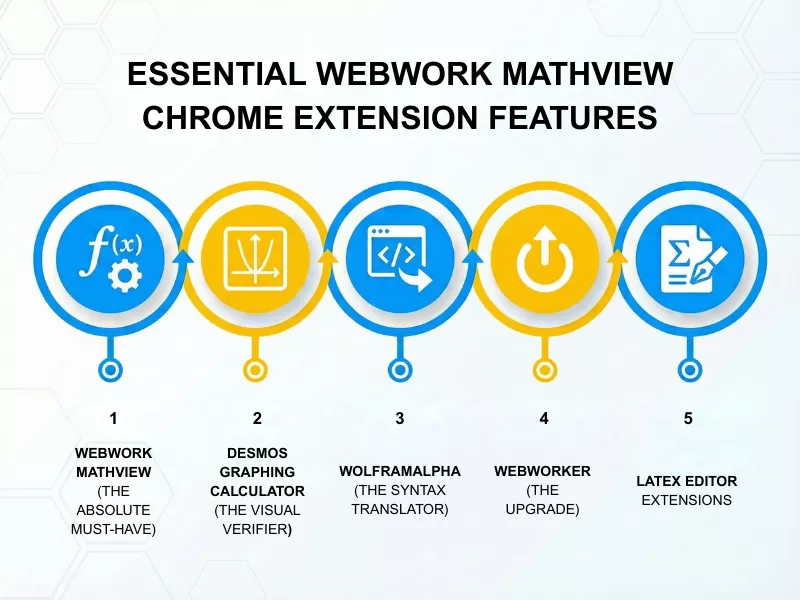
1. WeBWorK MathView (The Absolute Must-Have)
If you install only one thing, make it this. WeBWorK is notorious for having a “blind” input box where (sin(x))/x looks like a mess of text.
- What it does: It adds a real-time rendering window next to the answer box. As you type your raw text (e.g., sqrt(x^2+1)), it instantly shows you the formatted mathematical notation.
- Why you need it: You catch missing brackets and order-of-operations errors before you lose an attempt. It effectively gives you a “Preview Answer” button without reloading the page.
2. Desmos Graphing Calculator (The Visual Verifier)
Never trust your mental graph. WeBWorK frequently asks for domain, range, or limits that are easily misjudged.
- How to use it: Keep a Desmos tab open. Type your function into visually confirm key features like asymptotes, intercepts, and holes.
- Pro Tip: If WeBWorK asks for an interval, type the inequality into Desmos (e.g., x^2 – 4 > 0) to instantly see the shaded regions, making it easier to write the correct interval notation like (-inf, -2) U (2, inf).
3. WolframAlpha (The Syntax Translator)
WolframAlpha is smart enough to understand “messy” inputs, even to get MyEconLab answers.
- How to use it: If WeBWorK keeps rejecting your answer, type it into WolframAlpha first.
- The Hack: Look at the “Alternate forms” section in Wolfram’s results. Sometimes, WeBWorK prefers a specific simplified (or unsimplified) version of the answer that Wolfram provides.
4. WeBWorKer (The Upgrade)
A newer fork of the original MathView extension, WeBWorKer, includes the live preview features but adds a few quality-of-life upgrades:
- Parenthesis Checker: This WeBWorK homework solver tool highlights matching brackets so you can see exactly which closing parenthesis is missing.
- Safety Confirmations: Adds a “Are you sure?” pop-up before submitting questions with limited attempts, preventing accidental misclicks.
5. LaTeX Editor Extensions
Sometimes, WeBWorK’s input box is just too small for a massive multivariable equation.
The Strategy: Use a browser extension like “LaTeX Editor” to type your equation in a clean, large workspace. Once it looks perfect, copy the raw text and paste it into WeBWorK. This prevents the “cursor jump” glitches that often happen in WeBWorK’s native text boxes.
Is It Cheating to Get WeBWorK Homework Help?
Let’s be real: WeBWorK doesn’t always test your math skills; it often tests your patience with syntax. When you understand the calculus concepts but fail because of a missing bracket or a case-sensitive variable, that isn’t a learning gap; it’s a technicality.
Hiring professional do my online class service isn’t about bypassing the work; it’s about leveling the playing field. Think of DoMyOnlineClass123 as a specialized tutor who speaks the computer’s language. We ensure that your correct answers are actually recognized as correct by the system, saving your GPA from being tanked by a clumsy interface.
What Is the Best Way to Solve WeBWorK Homework Problems?

A. Reverse Engineer the Input Format
As discussed earlier, the input format of WeBWorK is tricky, and students often find it challenging to input their answers. Instead of focusing on the numerical answer, try understanding the format it requires. Here’s how you can do it:
→ Use the ‘preview’ button to understand how the system interprets the functions, parentheses, or variables, and input your answer accordingly.
→ Check for instructor hints on formatting to understand how you are expected to input the answer.
→ Try inputting simpler formats and preview them to understand what the system’s expectations are for correct answers.
B. Deconstruct Error Message
There are chances that you might enter the right answer only to see it’s incorrect. Before you panic and look here and there for answers at the last minute, check these things:
→ The system might show an incorrect answer because of a syntax error. It’s a good practice to use parentheses when entering functions, use the right symbols and variable names to ensure you get the answers correct.
→ If you come across a message that says a variable is not defined, use it as a hint and look for the right variable that the system accepts.
→ Copy and paste the error message you see on WeBWorK and search it on the web. It will help you find the right forums or groups that can eventually lead you to the right answers.
C. Use Symbolab, Wolfram Alpha, or Desmos
There are tools that can help you find the right answers fast before your deadline. However, you must only use it strategically and only when it is necessary. Here’s how you must go about it:
→ Don’t use it for cheating, but to check for syntax errors. You can enter expressions in a calculator or the function in the way you have written, to understand if you are on the right track. These tools render results in a format that WeBWorK accepts, thus helping you find answers fast.
→ Checking intermediate steps for a long problem sum. The tools will help you understand if you have made any mistakes in your initial steps or if there has been a calculation error. This will help you get the correct answers fast.
D. Use Other LMSs as WeBWorK Problem Solver
LMSs like Edfinity can help you with WeBWorK. The platform integrates with WeBWorK and can provide ways to get the answers. You can use such platforms to practice and perfect your skills.
E. Talk to Your Peers
Talk to your classmates to get your answers fast and submit the tasks on time. A simple, ‘Does this answer look right to you?’ can be of great help in such situations.
→ Call your classmate and ask if the first step of the problem looks the same for you and him. This will help you identify major conceptual errors and rectify them to get the answers faster.
→ You should focus on the type of answer. Understand what you are asked to share on the portal. This will save a lot of time and help you move in the right direction and score good grades.
F. Start Early, Maybe?
Last, and the most important tip to get answers fast on WeBWorK is starting early. Do not procrastinate and start working on your math problems days before the deadline. That way, you will not have to struggle when there’s no time.
You will have enough time to access online resources, understand the course materials, and answer the questions accordingly. Also, you will have enough time to practice. Consequently, you would be careful when entering expressions or numbers and score well.
That will help you get the right answers fast and submit the tasks within the deadlines. However, before we end this discussion, we will give an answer to one of the most important questions students ask: ‘Can hiring an expert help me get the work done?’
How to Hire a Pro for WeBWorK Assignments?
Place an Enquiry
Specify your requirement (assignment, homework, exam or quiz help, etc.) with a deadline.
Get a Quote
We will evaluate your needs and provide you with a free and custom quote that explicitly breaks down the fee structure for the tasks.
Confirm Order
For order confirmation, complete the quoted price. A flexible payment option is available.
Get the Service
The most qualified online class helper will be assigned to your task, and they will complete the work within the agreed-upon timeline.
Frequently Asked Questions
Can WeBWorK Detect Extensions?
Generally, no. WeBWorK is a server-side application, and most browser extensions (like WeBWorK MathView) operate on the “client side” (your browser). The system typically cannot see that you are using a tool to preview your equations. However, relying on extensions only helps with formatting, not the actual math. If you want to ensure the answer is correct before you type it in, the safest option is to have the experts at DoMyOnlineClass123 verify your work or handle the assignment for you.
Is It Legal to Get Help for WeBWorK Assignments?
Yes, seeking tutoring and homework assistance is legal. Think of it as outsourcing the busy work. WeBWorK often penalizes you for syntax errors rather than a lack of knowledge, which makes the “learning” aspect questionable. Services like DoMyOnlineClass123 provide expert academic support to help you navigate these punitive platforms without ruining your GPA over technicalities.
What Do I Put for “Does Not Exist” In WeBWorK?
The standard input is DNE. However, because WeBWorK varies by institution and professor settings, it might also require None or Infinity (if it’s a limit question). This inconsistency is one of the biggest complaints on Reddit. Instead of wasting your limited attempts guessing the format, you can let the tutors at DoMyOnlineClass123 handle the submission—we know the specific syntax preferences for every major university course.
Can WeBWorK Detect Copied Solutions or Cheating?
WeBWorK uses “randomized seeds,” meaning every student gets the same problem but with different numbers. If you copy a WeBWorK answer key directly from Chegg or a friend without adjusting the math for your specific numbers, the answer will be wrong, and it will be obvious to your professor. This is why automated solvers fail. DoMyOnlineClass123 solves your specific instance of the problem, ensuring the math matches the unique variables generated by your login.
Why Is WeBWorK Marking My Correct Answer Wrong?
If you are 100% sure your math is right, it is likely a syntax error. Common culprits include:
- Using decimal approximations instead of exact forms (e.g., typing 0.33 instead of 1/3).
- Missing parentheses (e.g., 1/x+2 vs 1/(x+2)).
- Case sensitivity (using X instead of x).
Don’t let a missing bracket tank your grade. Our team at DoMyOnlineClass123 is trained to spot these hidden syntax traps instantly and offer WeBWorK math help.
Can I Get Step-by-step WeBWorK Solutions from Experts?
Absolutely. While many students just want the green “Correct” banner, we understand you might need to study for the midterm. When you hire DoMyOnlineClass123, you can request full, WeBWorK step-by-step solutions and work for your problems. This allows you to submit the homework on time and learn the material at your own pace without the stress of the deadline.
How Do Tutors Provide Help for WeBWorK Math Problems?
It’s simple. Most students provide us with secure access to their WeBWorK portal. Our expert mathematicians log in, complete the assigned module, and log out. This ensures that all formatting, graphing, and multi-part questions are submitted correctly within the system. If you prefer not to share your login details, you can send screenshots to DoMyOnlineClass123, and we will send you the exact answers to enter.
Where Can I Find Accurate WeBWorK Answer Explanations?
Searching Google is risky because of the randomized numbers mentioned earlier. You might find a similar question, but the steps won’t align with your specific values. The only way to get 100% accurate explanations for your unique problem set is to use a custom service like DoMyOnlineClass123, where a human expert solves the problem fresh.
How Can I Improve My Grades Using WeBWorK Homework Assistance?
WeBWorK assignments usually account for 10% to 20% of your final grade. By hiring DoMyOnlineClass123 to ensure you get 100% on every homework set, you create a “grade buffer.” This means you can afford to score slightly lower on a difficult exam and still finish the class with an A. It’s the smartest way to manage your semester GPA.

Want To See My Profile — Check Now
- Online Class Help Costs by Subject and Level (2026 Guide) - February 19, 2026
- How to Get WileyPLUS Physics Answers? - February 11, 2026
- WeBWorK Homework Help: Survival Guide, Syntax Tips, and Answers - February 5, 2026