Canvas itself includes features that allow instructors to track quiz activity, submission times, and login behavior. When combined with tools like Turnitin, Respondus, or Proctorio, it can also help identify plagiarism and suspicious exam patterns. While no system is flawless, Canvas is designed to discourage dishonest behavior and support fair testing.
The good news? Succeeding in Canvas quizzes and exams is completely achievable with the right preparation. Understanding how Canvas works, managing your time effectively, and studying smartly can help you perform confidently, without risking academic penalties.
In this guide, we’ll break down how Canvas detects cheating, what it can and cannot track, and practical tips to help you succeed honestly in your online courses.
Key Takeaways
- Canvas alone has limited detection. It mainly tracks timing and quiz activity. Strong monitoring happens only when proctoring tools are used.
- Quiz logs show patterns, not proof. Logs record actions like tab changes and inactivity but cannot confirm cheating.
- Plagiarism checks require integrations. Canvas checks plagiarism or AI content only if tools like Turnitin are enabled.
- Canvas can’t see everything. Without proctoring, it cannot detect other devices, websites, or outside help.
- Honest preparation is the safest choice. Understanding the system, managing time, and studying well help avoid penalties and succeed confidently.
Can Canvas Detect Cheating?
Yes! Canvas can detect cheating when the exam is conducted using a proctoring software. Now, whether the exam will be proctored or not depends on your professor. As a premium Do my online class service provider, we have come across multiple requests from students to help with Canvas quizzes and assignments. We can also help you with MathXL answers.
How Does Canvas Detect Cheating?
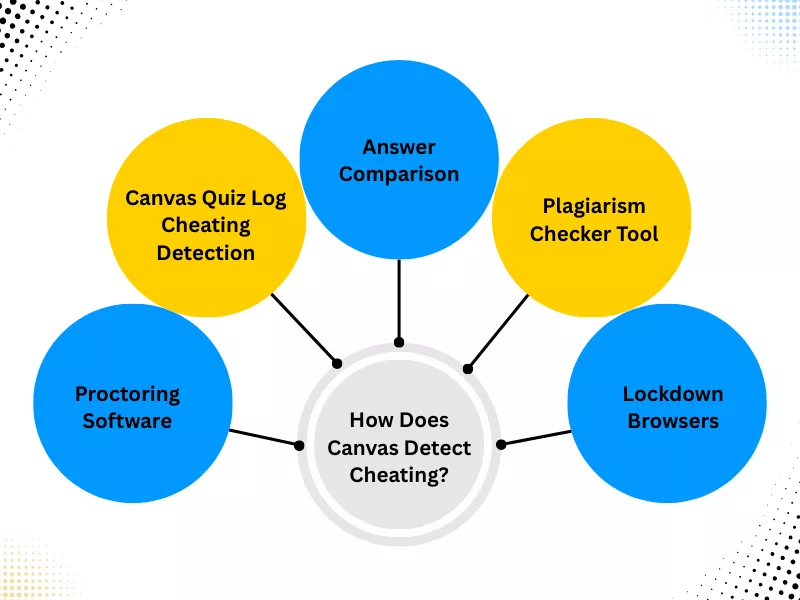
We have already mentioned how Canvas uses proctoring software to detect cheating. Here, we will look into the various ways the Canvas platform detects cheating, even when students use Canvas quiz answers hack:
A. Proctoring Software
The proctoring system is the online version of an exam invigilator. The Canvas proctoring tools track the test taker. Canvas tracks your credentials and the exam environment. The Canvas proctoring software (Respondus, Proctorio) can track you using your webcam and detect cheating by monitoring your screen. Furthermore, if you are taking classes in MyMathLab, you must know there’s a high chance your instructor will use Canvas to detect cheat on MyMathLab.
B. Canvas Quiz Log Cheating Detection
Canvas quiz log is another way the platform detects cheating. When you attend Canvas quizzes or tests, the platform monitors your activity using its quiz log. The Canvas system monitors when you exit the web browser or switch tabs. It also notifies your instructor if you are inactive for a long time.
C. Answer Comparison
The Canvas platform automatically compares students’ answers on the same exam. This method helps understand similar trends and behavior. While this is a way Canvas detects cheating, instructors might overlook it.
D. Plagiarism Checker Tool
With the canvas plagiarism checker integration and the built-in plagiarism checker tool, it can check for plagiarism in assignments. As soon as you submit Canvas assignments, it checks the document for plagiarism. The tool also provides the names of the sources from which the content is copied.
E. Lockdown Browsers
The Canvas LockDown browser features identify open tabs, which is useful for identifying and stopping learners from using unfair means. The tool also shares a video with teachers to watch after the exam, which allows your teachers to check your behavior during the exam. Similarly, if your institution uses LockDown browser, getting WebAssign answers becomes a challenge.
How Accurate Is Canvas Quiz Log for Detecting Cheating?

One of the most essential canvas cheating detection methods is quiz logs. Canvas quiz logs are only partially accurate for detecting cheating. They track student activity within the Canvas quiz interface, but they cannot confirm whether cheating actually occurred.
Canvas logs record technical events such as quiz start and submission times, question navigation, answer changes, inactivity periods, and instances when a student leaves the quiz page. These logs help instructors understand quiz behavior patterns, not student intent.
But again, can Canvas quizzes detect cheating all the time? Well, no!
What Canvas Quiz Logs Can Detect?
Canvas quiz logs can show:
- When a quiz attempt begins and ends
- Time spent on individual questions
- Answer changes during the attempt
- Periods of inactivity
- When the quiz page loses focus or is exited
This data can be useful for identifying unusual patterns, such as frequent page exits or extremely fast completion times. However, these indicators do not automatically mean cheating, just as if you use Edmentum cheat sheet, it does not mean the instructor will flag you.
That brings us to the question, ‘Is there any way to cheat on Canvas without getting detected?’
Managing tests, exams, and assignments on LMSs, as well as your daily work and studies, can be stressful. In the following section, we will talk about a few situations in which Canvas cannot detect cheating.
How to Cheat on Canvas Tests?

Despite the tools to detect cheating, there are ways students attempt to move around the system and cheat to achieve higher marks on Canvas tests and quizzes.
1. Utilizing Secondary Hardware
One of the most common methods of cheating is using a smartphone or tablet. Because Canvas can also only monitor the browser session it is running in, searching for answers on a separate device is notoriously difficult to detect. Students often ensure their device is charged and positioned strategically to cheat on Canvas without anyone noticing. Add- This method is particularly popular because even advanced security setups have blind spots. If you are specifically dealing with a proctored quiz, knowing the technical details of respondus lockdown browser for canvas can help you understand how to use secondary devices without triggering an environment alert.
2. Parallel Document Referencing
Before working on Canvas, students need to create comprehensive reference sheets in Word or PDF formats. By placing these windows adjacent to the browser, it is possible to cheat on canvas assignments by referencing notes. Unless the institution uses a proctoring service, this type of cheating remains largely invisible to the standard Canvas interface. Though please remember Canvas also uses LockDown browser! These types of questions can arise on other platforms, too, like WebAssign. So, you can look for How to get WebAssign answers for the references and hacks.
3. Custom Browsers and Collaboration
In some cases, students cheating on Canvas utilize custom browsers to facilitate screen sharing with peers. This allows for real-time collaboration on canvas quizzes come exam time. While Canvas can record your screen if specific plugins are enabled, a standard setup often lacks the visibility to detect cheating on Canvas occurring via external software.
4. Advanced Tactics: Audio Collaboration and External Hardware
A growing trend in canvas quiz cheating involves the use of discreet audio equipment. In this scenario, a student wears headphones and maintains a live communication line with a subject expert. By reading the questions aloud, the student can receive immediate verbal assistance and canvas and get the answers into the system in real time. Because the standard Canvas interface does not record audio, this method is significantly harder to detect than on-screen activity.
Furthermore, some students attempt to cheat during a network failure by claiming technical issues to gain extra time or a reset. Since Canvas tracks cheating through timestamps, inconsistencies in these logs are often how teachers see if you cheat.This also applies to students who wonder how to get WileyPLUS physics answers without getting detected.
Whether Canvas can now prevent cheating or not is still a lingering question because there are times it fails!
When Does Canvas Fail to Detect If You Cheat on a Canvas Test?
Despite common assumptions, Canvas quiz logs cannot:
- Show what websites or apps a student accessed after leaving the quiz page
- Detect Google searches, ChatGPT usage, or note-taking apps
- Identify the use of another device (phone, tablet, second laptop)
- Confirm whether someone else helped during the quiz
- Canvas does not record screen activity or browser history unless the exam uses proctoring tools such as Respondus LockDown Browser or Proctorio.
How to Cheat on Canvas Quizzes Like an Expert?

A common concern for students is Canvas quiz tab switching detection. While many believe the system is airtight, the “Quiz Log” feature has specific limitations. We have tried and tested a few hacks powered by the loophole within the Canvas environment, which students use to cheat without being detected by Canvas:
The 30-Second Inactivity Window:
Canvas can actually detect when a student navigates to a new tab or a different application, marking the student as “inactive.” However, instructors often see on canvas that inactivity only occurs after a roughly 30-second threshold. Some attempt to exploit this by quickly searching for information and returning before the log records a significant gap.
Proctored Environments:
When a canvas cheating online test involves video invigilation, the software primarily monitors the screen and eye movement. Because canvas itself does not detect physical objects placed strategically out of the webcam’s view, some users use physical cheat sheets or notes positioned near the keyboard.
Simulated Network Failures:
Because canvas track cheating through continuous connectivity, a manual Wi-Fi disconnection can be used to pause the clock. Since Canvas tells if you cheat primarily through active session data, an “offline” state creates a blind spot where a student’s needs can be met by searching for answers on a secondary device.
Understanding Cheat on Canvas Assignments
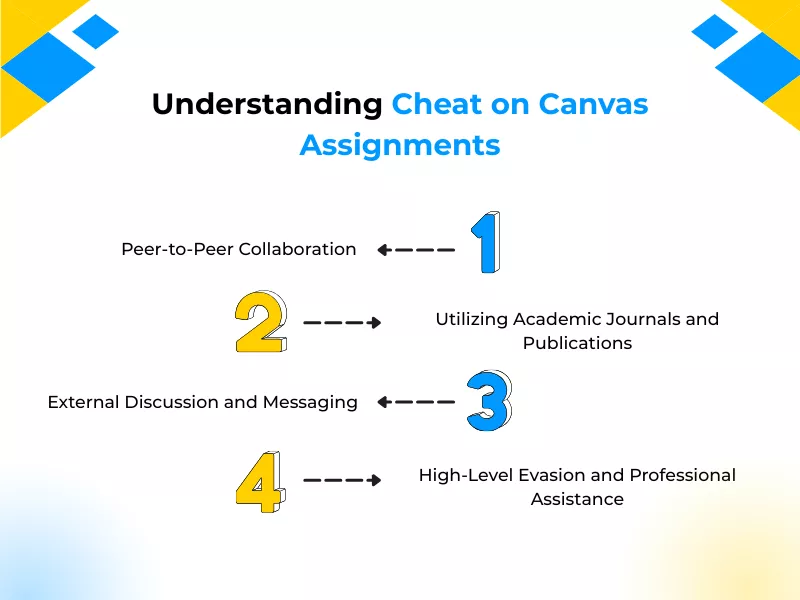
When submitting written work, the most common question is: “Does Canvas detect plagiarism?” While the platform does not have a native scanner, Canvas can integrate with advanced plagiarism checker software to detect similarities across global databases.
1. Peer-to-Peer Collaboration
While Canvas can log the timing and location of submissions, it does not directly track cheating between students who share drafts. To detect if you copy, software looks for identical strings of text. Students often bypass this by borrowing a peer’s work and paraphrasing the core arguments heavily. By changing the structure and vocabulary, the work remains original enough to avoid being recorded as cheating.
2. Utilizing Academic Journals and Publications
Students may also look to professional journals to elevate their work. To prevent cheating detection, they do not copy-paste; instead, they synthesize the high-level research into their own words. Because these tools are designed to detect verbatim matches, a complete rewrite of professional ideas allows for the submission of high-quality work that is difficult to flag as academic cheating.
3. External Discussion and Messaging
On-platform discussion boards are monitored, but “can Canvas detect activity on private messaging apps? No. Students often collaborate offline to structure their responses. This ensures that their on-platform contributions appear independent, helping them cheat canvas requirements for individual original thought.
4. High-Level Evasion and Professional Assistance
For those seeking to make cheating virtually invisible, hiring external help is a common tactic. Since custom writing services produce unique content tailored to specific grading criteria, standard tools used for catching students cheating on Canvas—which detect plagiarism using database matching—will not flag the assignment.
Can Canvas Detect Plagiarism?
When plagiarism tools are active, Canvas can analyze submitted assignments for:
- Copied text from websites, books, or academic papers
- Improper citations or paraphrasing
- Similarities between student submissions
- Potential AI-generated writing (depending on the tool used)
This means plagiarism detection in Canvas is course-dependent. Some assignments may be checked automatically, while others rely on manual review by instructors.
Canvas Plagiarism Checkers
When connected to plagiarism software, Canvas can:
- Generate similarity reports
- Highlight matched sources
- Compare submissions across the same class
- Flag unusually high similarity percentages
However, a similarity score does not automatically mean plagiarism. Instructors typically review reports manually to determine whether content misuse occurred.
Frequently Asked Questions
What Is Canvas Platform?
Canvas is a web-based learning management system (LMS). It is used by schools, universities, and businesses to centralize online learning, manage online coursework, track the progress of students, and facilitate communication between instructors and students for in-person, online, or blended learning environments. It is like a digital library for assignments, discussions, and grades, which is accessible from any device.
Can Canvas Detect Switching Tabs?
Yes, sometimes Canvas also detects switching tabs for cheating on tests. Canvas quizzes and tests themselves have limited ability to detect tab switching, but proctored exams are different. If your quiz or test is monitored using tools like Respondus LockDown Browser or Proctorio, tab switching, opening new windows, or leaving the exam screen may be logged or blocked entirely for catching students cheating on Canvas. Instructors can review these logs after the exam.
Can Canvas Detect Copy and Paste?
Canvas is an online LMS and does not automatically flag copy-and-paste actions on its own. However, during proctored exams, copy-and-paste may be restricted or recorded. Additionally, pasted content in assignments can later be flagged by plagiarism detection software if it matches existing sources.
What Does Canvas Track During a Quiz?
The possibility of cheating on Canvas, depending on the quiz settings, Canvas can track:
- Start and submission times
- Time spent on each question
- Answer changes
- IP address and login activity
- Quiz access history
When combined with proctoring tools, additional data, such as browser activity or flagged behaviors, may also be reviewed by instructors, which helps detect cheating, and in this way, Canvas prevents students from cheating.
Can Instructors See Your Screen on Canvas?
Not by default. Canvas alone does not allow instructors to see your screen. However, if your exam uses online proctoring software, screen recording, webcam monitoring, or audio recording may be enabled, with prior notice given to students.
Can Canvas Detect AI or ChatGPT Answers?
Canvas itself cannot directly detect AI-generated content. That said, instructors may use AI-detection or plagiarism tools to analyze writing patterns, originality, and consistency with a student’s past work. Sudden changes in tone, structure, or complexity may raise questions during grading.
Can Canvas Detect the Use of Another Device?
Canvas cannot directly detect another device on its own. However, remote proctoring tools may flag suspicious behavior, such as repeated looking away from the screen or unusual exam activity. Some exams may also restrict logins to a single session or device.
Can Canvas Detect Plagiarism without Turnitin?
Canvas does not have built-in plagiarism detection without integrations. However, instructors can manually review submissions or use alternative plagiarism-checking tools. Many institutions connect Canvas with services like Turnitin to automatically check assignments for originality.
Related Blogs

What Are The Best Ways To Get MyMathLab Answers For 100% Success?

What Are The Best Strategies For Finding Canvas Quiz Answers?

Expert Tips on How to Get WeBWork Answers

Want To See My Profile — Check Now
- How to Cheat on Respondus Lockdown Browser: Ultimate Guide - February 2, 2026
- Canvas Quiz Answers Hack: The Ultimate Guide for Students - January 9, 2026
- Can Canvas Detect Cheating and Plagiarism? - December 30, 2025